
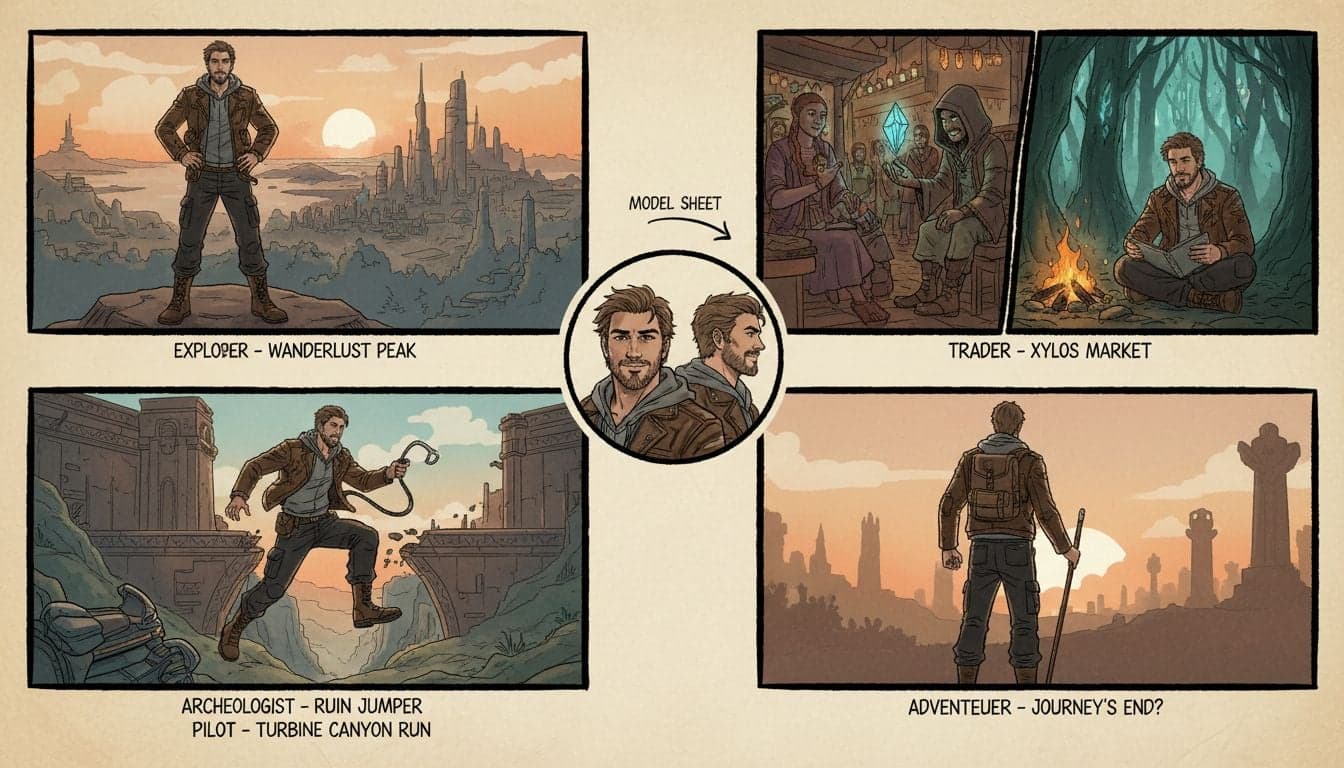
Creating compelling video narratives with AI requires more than just generating random scenes. The biggest challenge content creators face is maintaining visual consistency across shots—especially when building stories with recurring characters. Vexub Story Mode solves this problem by letting you define character references that persist throughout your entire video project.
Traditional AI video generators create each frame independently, resulting in characters that look completely different from shot to shot. Story Mode changes this paradigm by establishing character templates that the AI references for every generated scene, ensuring your protagonist looks the same whether they're in scene 1 or scene 50.
This tutorial breaks down exactly how to use Vexub Story Mode to create videos with rock-solid character consistency, from setting up your first character reference to advanced techniques for multi-character narratives.
What Makes Story Mode Different
Story Mode represents a fundamental shift in how AI generates video content. Instead of treating each scene as an isolated generation task, Story Mode treats your video as a cohesive narrative with persistent visual elements.
The core innovation is the character reference system. You provide Vexub with a detailed description or reference image of your character once. The AI then uses this reference as a blueprint for every scene where that character appears, maintaining consistent facial features, clothing, and visual identity across your entire video.
Persistent identity: Characters maintain the same appearance across unlimited scenes and different camera angles.
Scene context awareness: The AI understands how your character should look in different lighting conditions, distances, and scenarios while preserving core features.
Multi-character support: Define multiple character references within a single project to create stories with several recurring personalities.
Style consistency: Beyond characters, Story Mode maintains consistent visual styles, color grading, and artistic direction throughout your video.
This capability opens up storytelling possibilities that were previously impossible with AI video generation. You can now create serialized content, episodic narratives, and long-form stories where viewers genuinely recognize and connect with your characters.
Setting Up Your First Character Reference
The foundation of any Story Mode project is a well-defined character reference. This section walks through the exact process of creating a character that will remain consistent across your video.
Accessing Story Mode
Navigate to your Vexub dashboard and select 'Story Mode' from the video creation options. This interface differs from the standard Agent Video mode by providing dedicated character management tools.
Story Mode projects begin with a character setup phase before you write any scenes. This front-loaded approach ensures consistency from the very first frame.
Defining Character Attributes
Vexub Story Mode accepts character definitions through two primary methods: descriptive text or reference images. For maximum consistency, combine both approaches.
Text-based character descriptions should include:
Physical features: Age range, gender, ethnicity, hair color and style, eye color, distinctive facial features like scars or freckles.
Body type: Height, build, posture characteristics that affect how the character appears in different shots.
Clothing and style: Default outfit, color palette, accessories, overall aesthetic that defines the character's visual identity.
Unique identifiers: Tattoos, glasses, jewelry, or other elements that make your character immediately recognizable.
A strong character description might read: 'Female character in her late 20s with shoulder-length auburn hair, green eyes, fair skin with light freckles. Athletic build, approximately 5'7". Wears a navy blue leather jacket over a white t-shirt, dark jeans, and brown hiking boots. Silver pendant necklace. Confident posture with slight smirk expression.'
Using Reference Images
Upload 1-3 reference images showing your character from different angles. The AI analyzes these images to extract consistent visual features. Best practices for reference images:
Use clear, high-resolution images with good lighting
Show different angles (front view, profile, three-quarter view)
Ensure consistent appearance across all reference photos
Avoid images with heavy filters or distortions
Reference images significantly improve consistency, especially for complex character designs or specific aesthetic requirements that are difficult to describe with text alone.
Create videos like this with AI
Script, voiceover, images and subtitles — automated in minutes.
Creating Scenes With Character Consistency
Once your character reference is established, you can write individual scenes knowing your character will appear identically in each one. The scene creation process in Story Mode emphasizes both narrative flow and visual continuity.
Writing Scene Descriptions
Each scene description should focus on action, environment, and camera work rather than re-describing your character. Story Mode already knows what your character looks like—your scene prompts tell it what the character is doing.
Effective scene prompt structure:
Action or event: What is happening in this moment
Setting details: Location, time of day, environmental elements
Camera information: Shot type, angle, movement
Mood and atmosphere: Lighting, weather, emotional tone
Example scene prompt: 'Character walks through an abandoned warehouse, sunlight streaming through broken windows creating dramatic shadows. Medium shot tracking alongside her as she cautiously explores. Dusty atmosphere with golden hour lighting.'
Notice this prompt doesn't mention her auburn hair or leather jacket—Story Mode handles those details automatically based on your character reference.
Maintaining Consistency Across Scene Transitions
Story Mode excels at preserving character appearance across radical scene changes. Your character can move from a dark interior to bright exterior, from close-up to wide shot, from action sequence to dialogue scene while maintaining visual identity.
The AI handles natural variations that should occur—different lighting will change how colors appear, different distances affect level of detail—while keeping core features constant. This creates realistic consistency rather than uncanny repetition.
Advanced Story Mode Techniques
Beyond basic character consistency, Story Mode unlocks sophisticated storytelling capabilities when you understand its advanced features.
Multi-Character Narratives
Create up to 5 character references within a single Story Mode project. This enables dialogue scenes, group interactions, and complex narratives with multiple protagonists.
Each character reference works independently. When writing scenes, specify which characters appear: 'Character A confronts Character B in a dimly lit parking garage. Two shot composition with both characters visible.'
The AI maintains consistency for each character individually while correctly handling their interaction and spatial relationships within the scene.
Character State Changes
While Story Mode maintains consistency, you can create intentional character transformations by updating the reference mid-project. This is useful for time jumps, makeover sequences, or narrative moments where a character's appearance genuinely changes.
Create a new character reference for the transformed state, then specify which version to use in subsequent scenes. This allows controlled evolution while preventing unintended variations.
Combining Story Mode With Other Vexub Features
Story Mode integrates seamlessly with Vexub's other capabilities. Add Human Video Mode segments for real presenter moments, then return to Story Mode for narrative scenes with consistent animated characters.
Layer AI-generated voiceovers, background music, and subtitles over your Story Mode footage. The character consistency foundation makes it easier to create professional-looking videos that maintain viewer immersion.
Troubleshooting Character Consistency Issues
Even with Story Mode's advanced consistency engine, you may occasionally encounter variations. Here's how to diagnose and fix common issues.
When Characters Look Different Between Scenes
If your character appears inconsistent, review your character reference first. Vague descriptions or contradictory reference images confuse the AI.
Solution 1: Strengthen your character description with more specific details about distinctive features.
Solution 2: Use higher quality reference images that clearly show facial features.
Solution 3: Regenerate problematic scenes individually while keeping successful scenes intact.
Story Mode allows scene-level regeneration without affecting your entire project, making it easy to fix isolated inconsistencies.
Balancing Consistency With Scene Requirements
Extreme camera angles, unusual lighting, or dramatic action sometimes challenge the consistency system. The AI must balance maintaining character identity with creating visually compelling scenes.
For challenging scenes, add more specific guidance in your prompt: 'Character in silhouette during sunset—emphasize recognizable body language and jacket silhouette even though facial features aren't visible in this lighting.'
This helps the AI understand which consistency elements matter most in each specific scene context.
Creating Professional Stories With Story Mode
Story Mode transforms AI video generation from a novelty into a legitimate storytelling tool. Content creators are using character consistency to build faceless YouTube channels with recurring animated hosts, serialized story content, and educational videos with persistent mascot characters.
The key is treating Story Mode as a production tool rather than a random generator. Plan your narrative, design memorable characters with strong visual identities, and use the consistency features to build viewer recognition and connection.
Start with short stories—30 to 60 second narratives with 3-5 scenes. This gives you experience with the character reference system without overwhelming complexity. As you master the tool, expand into longer formats and multi-character stories.
Vexub Story Mode proves that AI video generation has evolved beyond random clips. With proper character references and thoughtful scene construction, you can create genuine narratives that engage audiences and build loyal followings—all without ever showing your face or hiring actors.







